Skip to content

A hacked website rarely needs a full rebuild, but the order of the steps matters. Secure your passwords, save a copy, call your host, then clean the files, close the hole and ask Google for a review. This guide covers the common signs, 7 recovery steps, what not to do, and how to keep it from happening again.
Signs your website has been hacked
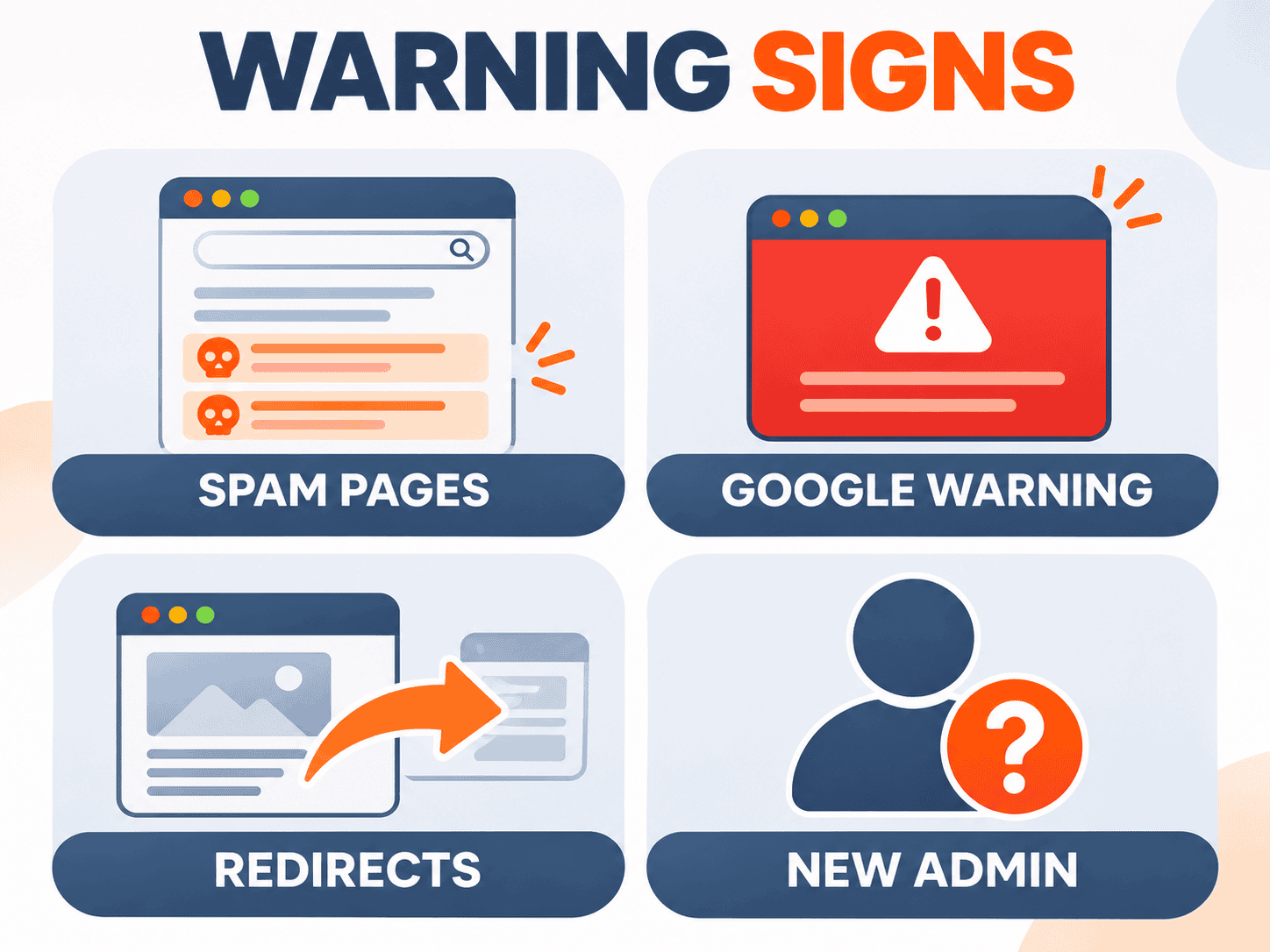
Most owners do not find out on their own. A customer messages them, or traffic suddenly drops. Spam hacks are built to stay hidden from the owner: the homepage can look perfectly normal while visitors arriving from Google or on mobile are sent somewhere else. These are the signs we see most often.
| Sign | Quick check | Urgency |
|---|---|---|
| Casino, baccarat or foreign-language pages in Google | Search site:yourdomain.com in Google | High |
| "This site may be hacked" in Google or a red browser warning | Search Console, Security issues report | Very high |
| Visitors from mobile or Google get sent to another site | Tap your own result in Google on a phone | Very high |
| Admin users you do not recognise | WordPress Users screen | High |
| Your domain's email lands in spam, or the host reports odd email | Ask your host for mail logs | Medium |
| The site is suddenly very slow, or the host suspended it | Check notices from your host | Medium |
Casino spam or foreign-language pages in Google
The most common hack on Thai business sites is hundreds of new pages appearing in Google for online slots, baccarat, pharmacy products, or Japanese and Chinese text that the owner never created. The quickest check is to search Google for site:yourdomain.com and look for pages you do not recognise, then try site:yourdomain.com casino or site:yourdomain.com สล็อต. This kind of spam usually does not show up in the WordPress dashboard; it hides in files or the database.
Google shows "This site may be hacked"
If your search result shows “This site may be hacked”, or browsers show a red warning screen, Google has detected that someone changed existing pages or added spam pages. The warning stays until the owner cleans the site and requests a review. In the meantime most people will not click through, so enquiries almost stop.
What to do in the first 24 hours
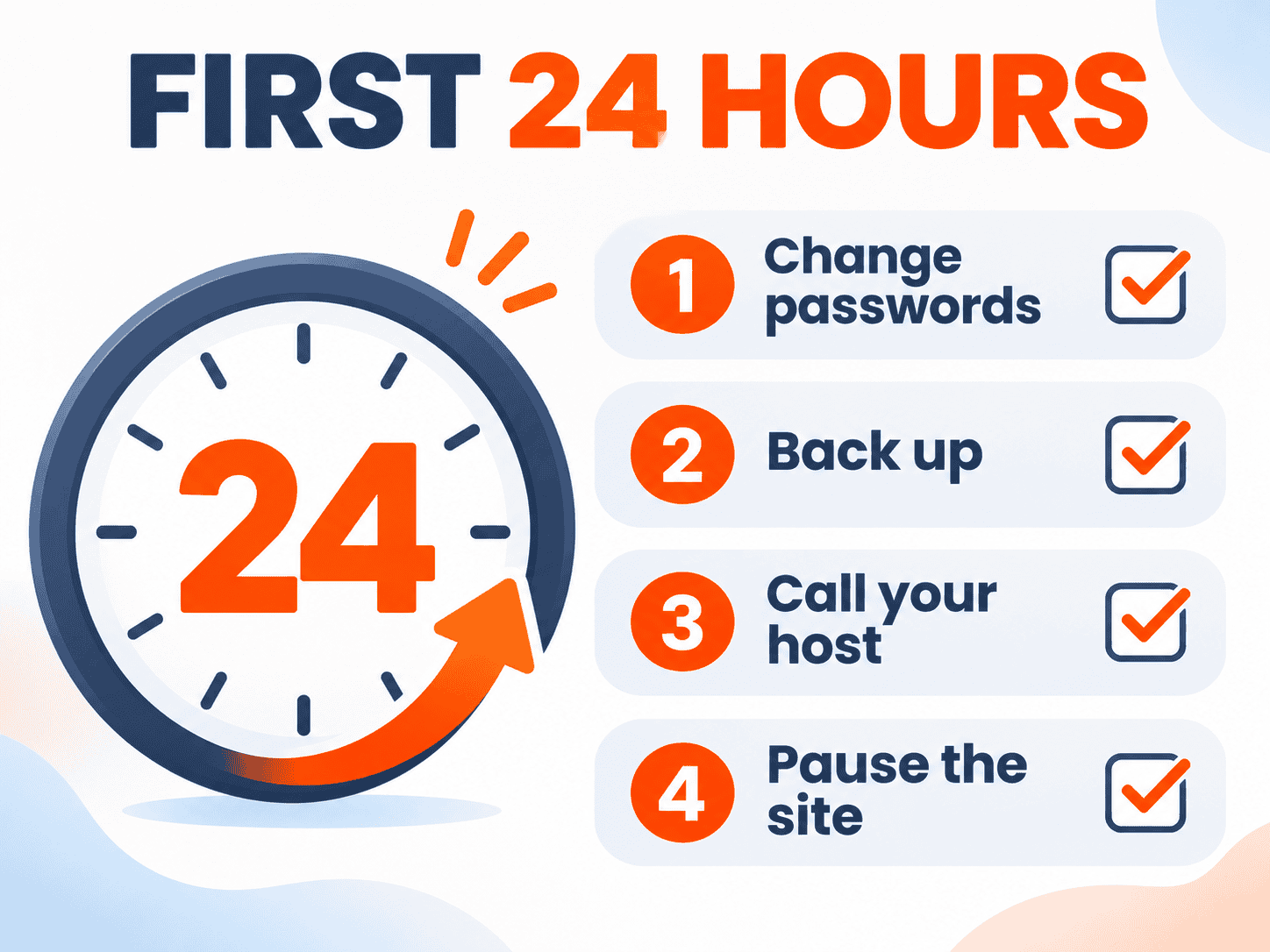
The first day matters most. The goal is to stop the damage and keep evidence for whoever cleans the site. Do not start deleting things yet. Do these 4 steps first.
Step 1: Change every password. All WordPress admin accounts, hosting or cPanel, FTP or SFTP, the database, and the email used for password recovery. Check the Users screen for Administrator accounts you do not recognise. Note them down; do not delete them yet.
Step 2: Back up the site as it is now. Files and database, even though they contain malware. This copy shows how the attacker got in and what they changed. If you have never set up proper website backups, ask your host to make a copy and tell you which older backups exist.
Step 3: Contact your host. Hosts can see things you cannot: recently modified files, access logs, or other sites in the same account that are also infected. Some offer free scanning or older backups. If the host has already suspended the site, you need to talk to them before recovery can start.
Step 4: Take the site offline if it is harming visitors. If it redirects to gambling sites or triggers strange downloads, switch on maintenance mode or ask the host to pause it so customers are not affected. If the site takes payments or stores customer data, inform your payment provider too.
What not to do when your site is hacked
- Do not wipe and reinstall straight away. If you do not know how they got in, a fresh install with the same plugins and passwords can be hacked again within days.
- Do not just restore a backup and stop. The backup may already have been infected, and the original hole is still open.
- Do not rely on one scanner plugin. Scanners help find files, but some malware lives in the database or outside the WordPress folder where plugins cannot see it.
- Do not request a Google review before the cleanup is finished. A failed review keeps the warning up longer.
- Do not replace plugins or themes with nulled copies. Pirated plugins are one of the most common causes of hacks.
How to recover a hacked WordPress site
Once the damage is contained, the last 3 steps are the actual recovery. You need access to files through SFTP or a file manager, and to the database. If you are not comfortable with either, get help; deleting the wrong file can take the whole site down.
Clean infected files and the database
Step 5. Reinstall WordPress core from the official source, and reinstall plugins and themes from their official sources. Check the uploads folder for .php files that should not be there. Inspect wp-config.php and .htaccess for injected code or hidden redirects. In the database, look for unknown admin users, spam posts or pages, and scripts injected into content or site settings. Finally, generate new security keys (salts) so every logged-in session, including the attacker’s, is signed out.
Close the hole the attacker used
Step 6. Cleaning without closing the entry point is like tidying the house and leaving the door unlocked. Common entry points are plugins or themes that have not been updated, abandoned plugins, nulled copies, weak admin passwords, and an outdated PHP version. Remove unused plugins, update everything, turn on two-factor authentication for admins, and keep only the Administrator accounts you really need.
Ask Google for a review in Search Console
Step 7. When the site is clean, open Google Search Console, go to the Security issues report and click Request a review. Briefly explain what you removed and which vulnerability you fixed. Google advises requesting a review only once the problem is fully fixed. Removed spam pages should return 404 or 410, and the Removals tool can take them out of search results faster. Google’s own steps are in its guide to requesting a review for a hacked site. If the site is not verified in Search Console yet, verify it first.
Does a hack hurt SEO, and how long does recovery take?
Yes, and the longer it runs, the worse it gets. While the warning is showing, far fewer people click through, and spam pages compete with your real pages and make the whole site look less trustworthy.
According to Google, reviews for spam-hacked sites can take several weeks because they may involve manual checks. If the review passes, search and browser warnings should disappear within about 72 hours. Rankings return gradually as Google recrawls the clean pages. Nobody can promise your old positions back by a certain date. What you can control is cleaning everything, closing the hole, and passing the review the first time.
How to stop it happening again
- Update regularly. WordPress, plugins and themes at least monthly, with a check after each update. If your team does not have time, compare what monthly maintenance costs with the cost of a hack.
- Use plugins and themes from official sources only, and delete the ones you do not use.
- Long, unique passwords plus 2FA on every account with admin rights.
- Automatic backups stored off the server, with a real test restore at least once a year.
- Keep Google Search Console connected. Google emails you when it detects a security issue, so you hear about it before your customers do.
No method guarantees a site will never be hacked, but steady maintenance makes it much less likely and much faster to recover. If you would like someone to handle this every month, see our monthly website maintenance.
When to call a professional
If the spam keeps coming back, you are not sure which files to delete, the site runs a shop or booking system, or it is your main source of customers and cannot stay down, paying someone experienced is usually cheaper than losing weeks of enquiries. The Deemmi Fix website repair service starts with a full audit for 2,900 THB, with a plain-language report and a fixed-price recovery quote within 2 business days. The audit fee is credited in full when we do the recovery within 60 days (prices exclude 7% VAT).
Typical hacked-site recoveries run around 9,000 to 18,000 THB. Large sites or sites damaged in several places are quoted per project after the audit. If the site is down and needs to come back first, emergency recovery starts from 7,500 THB to get it online, followed by an audit to find the cause. We cannot guarantee a site will never be attacked again, but the recovery work itself carries a 14-day guarantee.
Summary
A hacked website can be recovered if you follow the order: change passwords, save a copy, contact your host, take the site offline if it is harmful, then clean files and database, close the hole, and only then ask Google for a review. Do not skip closing the hole; it is the number one reason sites get hacked again. If you would rather not risk doing it yourself, send your site to Deemmi Fix for an audit on LINE.

FAQ: hacked websites
How do I know if my website has been hacked?
Search Google for site:yourdomain.com and look for pages you do not recognise, such as casino or foreign-language pages. Check for the “This site may be hacked” label or a red browser warning, and look for unknown admin users in your dashboard. The Security issues report in Google Search Console also shows what Google has found.
Do I need a new website after a hack?
Usually not. If the files and database are fully cleaned and the hole is closed, the existing site can keep running. A rebuild only makes more sense when the site is too old to update, or damaged in so many places that recovery would cost about as much as a new site.
Can I remove casino spam pages myself?
You can delete the pages you see, but the spam usually returns if the source files or the entry point are still there. Clean both files and database, reinstall core, plugins and themes from official sources, change passwords and salts, and only then ask Google for a review.
How long does a Google review take after a hack?
According to Google, reviews for spam-hacked sites can take several weeks. If it passes, warnings should disappear within about 72 hours, and rankings return gradually as Google recrawls the clean pages.
How much does it cost to fix a hacked website in Thailand?
It depends on the size of the site and the damage. At Deemmi Fix, typical cases run around 9,000 to 18,000 THB, starting with a 2,900 THB audit that is credited back when we do the recovery. Large sites or sites damaged in several places are quoted per project.
Sources
- Patchstack, State of WordPress Security (annual report)
- WordPress.org, Hardening WordPress and Updating WordPress (official guides)
- PHP.net, Supported Versions (PHP support timeline)