Skip to content


Website maintenance cost is what you pay for someone to keep your site updated, backed up and working every day. In Thailand it ranges from a few thousand baht a month for a standard business site to five figures for stores and booking systems. This guide shows what should be included, what is usually billed separately, and which payment model fits which kind of website.
What website maintenance is, and how it differs from hosting
Three recurring costs come with a website and they are easy to confuse. Hosting is the rent for server space. The domain is the yearly fee for your web address. Website maintenance is the labour of the person who updates the system, checks security, keeps backups and fixes things when the site misbehaves. The first two buy you a place; the third buys you a caretaker.
A WordPress site with nobody looking after it degrades on its own. WordPress, plugins and themes release new versions constantly, and old versions pick up security holes and start breaking. The routine tasks are listed in our WordPress maintenance checklist. This article focuses on price and on what you should get for it.
How much does website maintenance cost per month

The Thai market splits into four tiers depending on who does the work and how much of it. The ranges below are what we see most often, not official rates. Get at least two real quotes before deciding.
| Model | Typical range | What you get | Suits |
|---|---|---|---|
| Do it yourself | No fee | Updates when you can, nobody accountable | A few-page site that is not a lead channel |
| Pay per fix | Low thousands THB per job | Only the problem you called about | Sites that rarely change |
| Monthly plan | Low to mid thousands THB/month | Updates, backups, security, a report | Company sites, lead sites, small stores |
| Full-service agency | High thousands to five figures THB/month | More hours, faster response, some add SEO | Stores, booking sites, multilingual sites |
Why maintenance prices differ between providers
- Size and complexity of the site. A 10-page company site and a 500-product store take very different amounts of time to check. Sites with booking systems, several languages or many plugins usually need a health check before a quote.
- Update frequency. Monthly, fortnightly or weekly. More often is safer and costs more.
- Included edit hours. Some plans include one or two hours of small content edits a month; others bill every change.
- Response time. Replying within one business day and replying within two hours with an emergency number are different price brackets.
- Whether hosting is bundled. Bundled plans look more expensive, but itemised they are sometimes cheaper than paying separately.
- How far security goes. Closing holes by updating is one thing; malware scanning and clean-up after a breach is a much bigger job.
What website maintenance includes
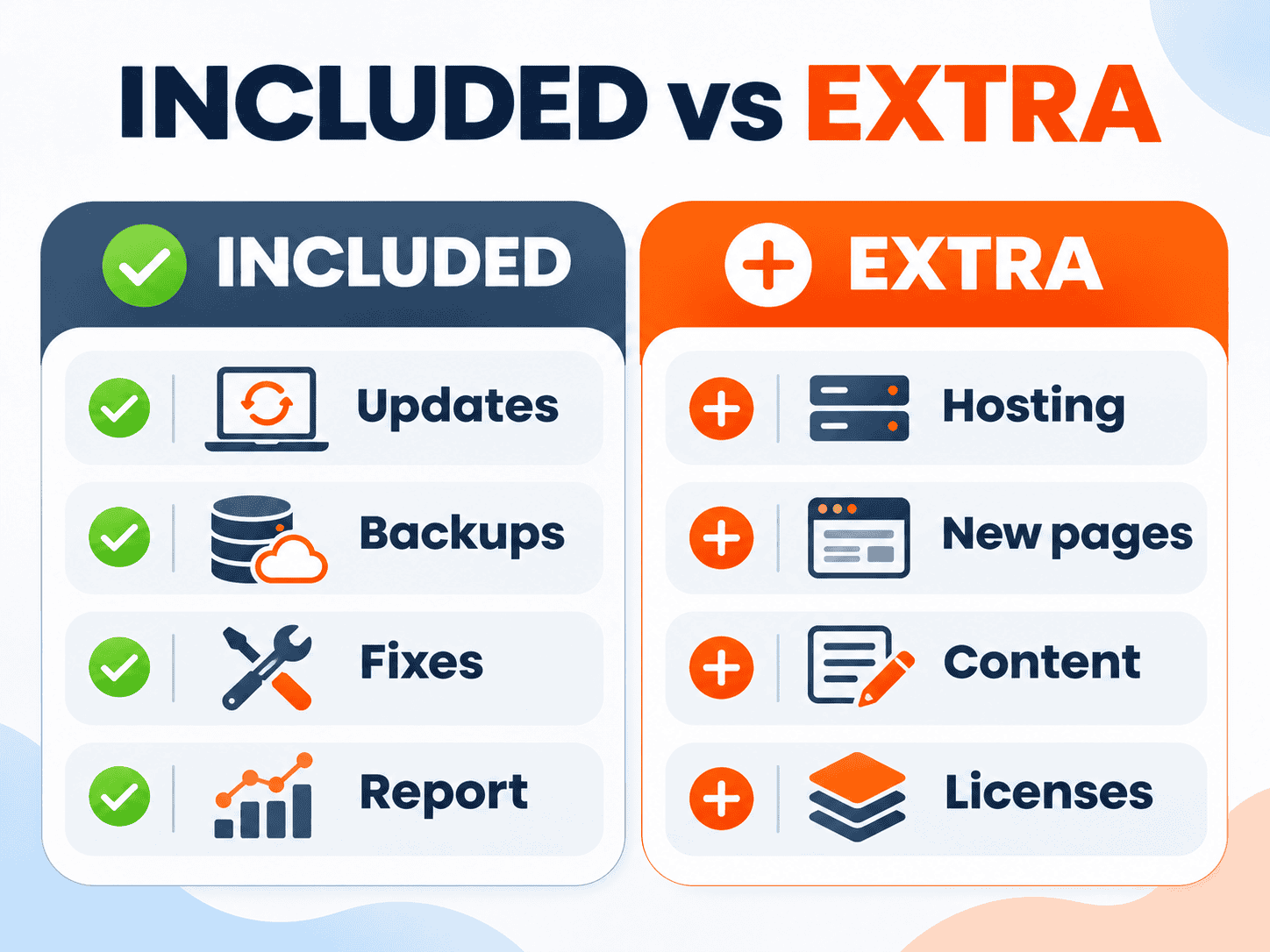
A good plan does routine work without waiting for you to ask, and states clearly what is in the plan and what costs extra. Use this table as a checklist when you read a quote.
| Item | Should be in the plan | Usually extra |
|---|---|---|
| System updates | At least monthly, with a page check afterwards | PHP upgrades, server moves |
| Backups | Automatic, restored for you | Daily off-site backups |
| Security | Holes closed by updating, bot and spam protection | Deep malware scans, clean-up after a breach |
| Fixes | Errors from the system or updates | New features, new pages, redesigns |
| Small content edits | A stated number of hours per month | Extra hours, writing content |
| Reporting | Work done and site health, at least quarterly | SEO or ad performance reports |
| Support channel | A stated response time | Out-of-hours emergency line |
| Hosting and domain | Renewals tracked so nothing lapses | The yearly fees themselves |
The item people forget to ask about is the report. Maintenance is invisible work. Without a report saying what was updated this month, when the backup ran and what looked odd, you have no way of knowing what you paid for. If a plan has no report, ask how they will prove the work was done.
What is usually not included
These are not maintenance; they are new work or third-party costs, so most providers bill them separately.
- Hosting and domain. Yearly rent paid to the hosting company, not labour.
- Paid plugin and theme licences. Pro page builders, multilingual plugins, paid SEO tools. Usually paid directly by you, or through the provider with a handling fee.
- New pages, new features and design changes. Adding a service page, building a booking flow or redesigning is project work, priced by scope just like the original build. See our website pricing guide.
- Writing content and articles. Plans usually “upload it for you” but do not “write it for you”.
- Recovery after a hack. If the site was compromised before the plan started, or the damage comes from a server-side hole the web team does not control, clean-up and recovery are normally quoted as a separate job.
- PHP upgrades and server migrations. Hosting-side work that needs the whole site re-tested, usually billed once.
Monthly, yearly or pay-per-fix: which is better value
It depends on how much the site matters to the business and how often things go wrong.
| Model | Worth it when | Watch out for |
|---|---|---|
| Pay per fix | The site rarely changes and breaks two or three times a year at most | No prevention, and nobody may be free the day it goes down |
| Monthly | The site brings in customers, gets ad traffic or has a store | Ask for a report so you can see the work |
| Yearly | You have used the provider before and are happy | Check the refund terms first |
A simple rule: if you expect to call someone more than five or six times a year, monthly or yearly is usually cheaper and you get preventive work thrown in. If the site barely changes and is not a lead channel, pay-per-fix is fine, as long as you accept that on the day it goes down nobody may be free to take the job.
Which websites need a maintenance plan, and which can go without
You can manage it yourself if the site is a few company pages with no member area or payments, someone on your team is comfortable pressing update and restoring a backup, and you can live with the site being down for a day or two.
You need a plan if any of these apply:
- The site brings in customers. It has a contact form, ads send traffic to it, and every day it is down is a lost lead.
- It has an online store or takes payments, with customer data in the system.
- It is a hotel, tour or seasonal business, where a crash in high season with nobody answering is expensive. See what we build for hotel websites that take direct bookings.
- It has been hacked before, or it is a media site with heavy traffic.
- Nobody on the team is willing to touch the back end.
How to check that your maintenance provider actually does the work
Cheap or expensive matters less than whether the work actually happens. These checks work with any provider.
- Ask to see last month’s report for another client (names hidden). If there is no report to show, there may be no work to report.
- Ask where backups are stored and when a restore was last tested. A backup that has never been restored is a backup nobody knows works.
- Ask for the response time and the emergency channel, written into the contract in hours, not “as fast as possible”.
- Ask what is tested after an update. Clicking update takes a minute; checking the pages still render correctly is the real job.
- Check who owns what. Domain, hosting and the admin account should be in your business name, not the provider’s.
Deemmi Care pricing: monthly website maintenance in Thailand
For businesses without an in-house technical team, Deemmi offers Deemmi Care monthly website maintenance for standard WordPress sites, starting from 1,500 THB per month or 15,000 THB per year, with a pay-per-fix option from 1,500 to 2,500 THB per job. Clients who build their site with Deemmi get the first 30 days after launch free.
The plan covers monthly WordPress, plugin and theme updates with a page check afterwards, restorable backups, fixes for system errors, and a LINE channel to reach us when something is wrong. Where we have server access, we also coordinate PHP version updates with your host and test the site. It does not cover hosting, the domain, or damage from attacks, which we assess and quote separately. Larger or more complex sites such as online stores, booking systems and multilingual sites get a health check first and a quote based on the actual site.
If you do not have a site yet, or the old one is too far gone to maintain, see our WordPress website design service, which is delivered with 30 days of care and can continue straight into Deemmi Care.

Summary
Website maintenance is not rent for space; it is paying someone to keep the site working every day. In Thailand it starts from a few thousand baht a month for a standard site and rises with site size, update frequency and response time. Before you pay, check what is included, what costs extra, and whether the provider can prove the work with a report. If your site is a lead channel and nobody on your team looks after the back end, see Deemmi Care plans and send us your URL for a free health check first.
FAQ
How much does website maintenance cost per month?
For a standard WordPress company site in Thailand, basic plans usually start from a few thousand baht a month and cover updates, backups and basic fixes. Sites with a store or a booking system cost more because they take longer to look after.
Does website maintenance include hosting?
Usually not. Hosting and the domain are yearly rent paid to the hosting company. Some providers bundle them; ask for an itemised quote so you can compare like with like.
Can I skip a maintenance plan?
Yes, if someone on your team updates the system regularly, knows how to back up and restore, and you accept finding a technician yourself when the site goes down. If the site brings in customers or takes payments, leaving it unattended is usually riskier than the fee.
What is the difference between pay-per-fix and a monthly plan?
Pay-per-fix means calling someone when there is a problem and paying per job, with no preventive work. A monthly plan means someone checks and updates the site before problems happen and you have a channel to ask questions. If you expect frequent call-outs, monthly is usually cheaper.
What should I ask for before signing a maintenance contract?
A sample monthly report, how and where backups are kept, a response time stated in hours, a list of what is and is not included, the cancellation terms, and confirmation that the domain, hosting and admin account are in your business name.